

Rahebar Alam Khan is a SEO Analyst and worked with over 10+ Global and Domestic brands. He has expertise in Tech SEO, Automation, Content Brief, Internal Linking, and Analytics.
Introduction
AI-powered tools like ChatGPT, Perplexity, Gemini, and Copilot are changing how users discover and interact with content online. Instead of searching through multiple pages on Google, people are now asking AI assistants for answers, and these assistants often include direct links to external websites as part of their responses. This shift is quietly reshaping referral patterns and introducing a new category of traffic that most marketers aren’t measuring accurately.
In Google Analytics 4 (GA4), visits coming from AI tools are often categorized as Direct or Referral traffic. This means marketers may be unaware that a portion of their audience is arriving from AI-driven recommendations rather than traditional search or social channels. As AI continues to integrate with search behavior, understanding this segment becomes increasingly important for accurate reporting, attribution, and content optimization.
In this article, we’ll explore why tracking AI tool traffic matters, how it impacts marketing insights, and how to set it up in GA4 using a custom channel group. By the end, you’ll have a clear framework to identify and analyze traffic generated by emerging AI tools.
The Rise of AI Driven Traffic
AI tools have rapidly evolved from simple chat interfaces into powerful information gateways. Platforms like ChatGPT, Perplexity, Gemini, Copilot, and Claude are now capable of answering complex questions, summarizing content, and recommending sources, often linking directly to relevant web pages. This behavior closely resembles how users interact with search engines, but the discovery journey now begins inside an AI interface rather than a browser search bar.
For marketers, this represents a major shift. Traffic that once came primarily from Google or Bing may now originate from AI chatbots or AI-powered browsers. For example, when a user asks Perplexity for “the best SEO tools in 2025,” it might display and link to specific websites. Similarly, ChatGPT’s “Browse with Bing” feature includes live source links that users can click. These clicks appear in analytics platforms as referral visits, but without proper setup, they are indistinguishable from regular traffic.
The growth of these tools has been exponential. Perplexity reached millions of active users within months of launch, and ChatGPT continues to be one of the most visited platforms globally. As AI adoption accelerates, the number of visitors landing on websites via AI recommendations will continue to increase.
For digital marketers, recognizing this traffic early is crucial. It helps identify new channels of influence, measure visibility across AI-driven environments, and understand how AI tools shape brand discovery. Ignoring it means losing insight into a rapidly growing segment that could soon rival traditional organic search in impact.
Why Tracking AI Traffic in GA4 Matters
As AI-driven discovery becomes more common, the ability to measure and differentiate this traffic within Google Analytics 4 is essential. By default, GA4 does not categorize visits from AI tools as a unique traffic source. Instead, these sessions are usually grouped under Direct or Referral traffic. This lack of separation makes it difficult to understand how much visibility your brand or website is gaining through AI platforms.
When AI traffic is not tracked separately, it can create several challenges for marketers:
- Misattributed Traffic – An increase in direct sessions might appear to signal returning visitors or strong brand loyalty, when in reality, some of that traffic is coming from AI tools linking to your pages.
- Inaccurate Performance Insights – Without clear data on AI referrals, you can’t accurately measure which channels are driving engagement and conversions.
- Missed Optimization Opportunities – If you don’t know which pages AI tools frequently recommend, you miss the chance to strengthen and expand similar content to capture more of that audience.
Tracking AI traffic separately helps solve these issues. By creating a custom channel group in GA4, marketers can isolate visits from sources like chat.openai.com, perplexity.ai, and gemini.google.com. This allows for a more precise understanding of where traffic originates and how it performs compared to other channels such as Organic Search, Paid Search, or Social Media.
Beyond accuracy, tracking AI traffic opens new opportunities for insight. You can analyze how AI-driven visitors behave differently, what kind of content attracts them, and how their conversion patterns compare with other audiences. These insights are invaluable for refining content strategy, improving attribution models, and anticipating shifts in user behavior as AI continues to influence the digital ecosystem.
Step-by-Step Process to Track AI Traffic in GA4
There are tons of ways to track AI traffic in GA4 but the method we gonna discuss is really easy and its shows are a channel in GA4 such as Organic Search and paid search.
Step 1.
After you land on Google analytics there lots of dashboard features but without any hassle we will jump to Setting. After you select you GA property where you want to create the tracker.
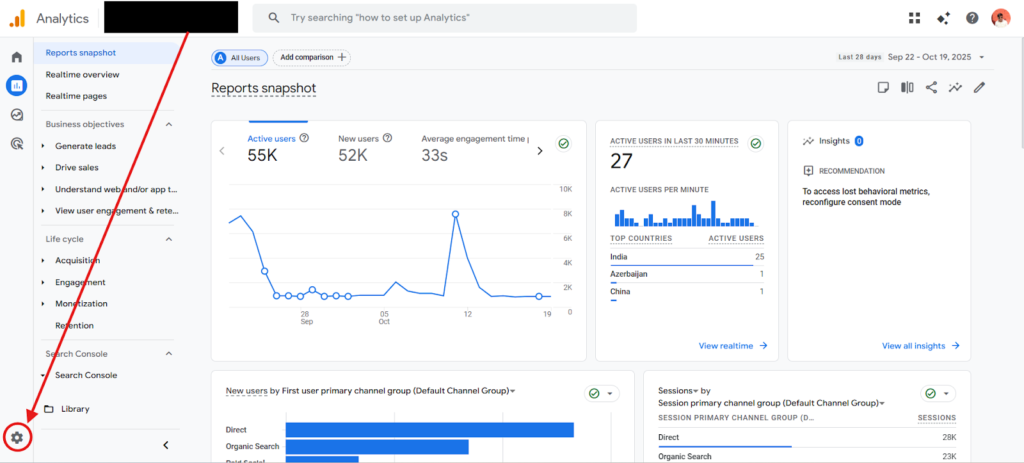
Step 2.
After you go to setting/Admin section there lots of other options are there such as account details, prosperity details and more apart from these options divide in to multiple parts such as Account, Property, Data Collection, Data Display and more. We will need to go for Data Display.
To reach the secion you need to scroll the page a bit.
Step 3.
Once you reach the section just click and open it. Here you see the default channel group which you use often for data analysis.
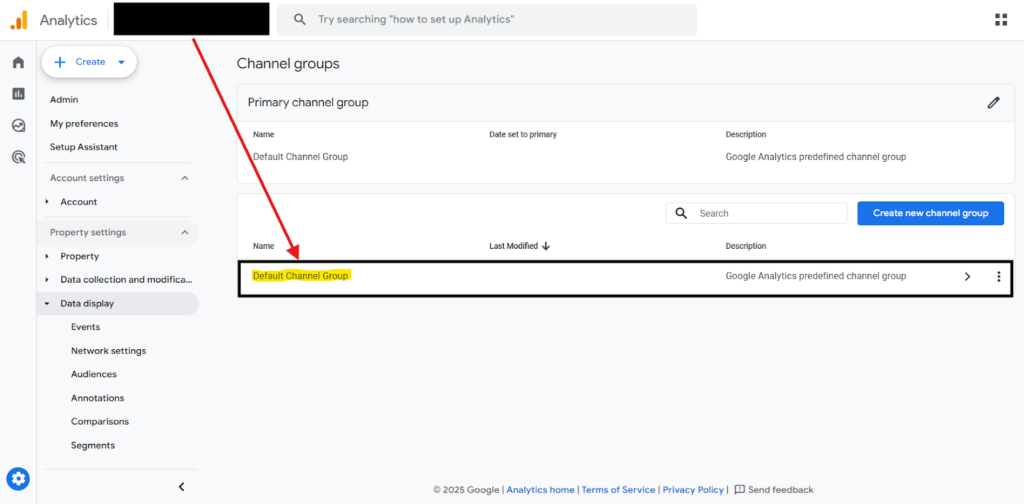
In the above given image you see the defaul challen group.
Step 4.
Once you reach this section you can see a option to create a new custom channel group which will named as AI Tracker. Once you click on create custom channel group there are few field you need to fill to progress so first is Group name which necessary and description which is optional.
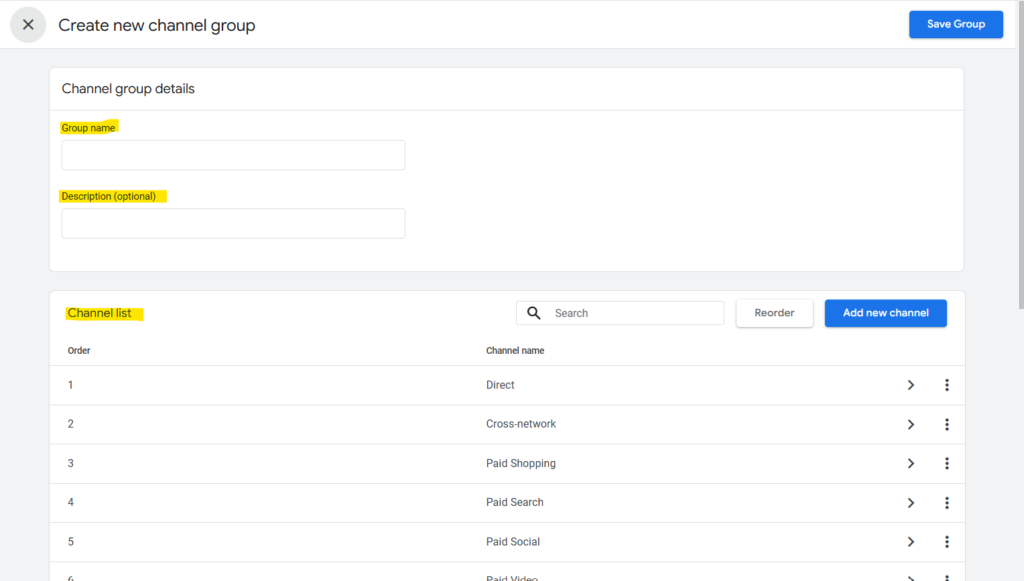
Once you filled the necessary field then we need to delete all the existing channels such as Direct, Organic Search, Paid Search, Social Media, Email and all. To delete it click on three dot and click remove the channel.
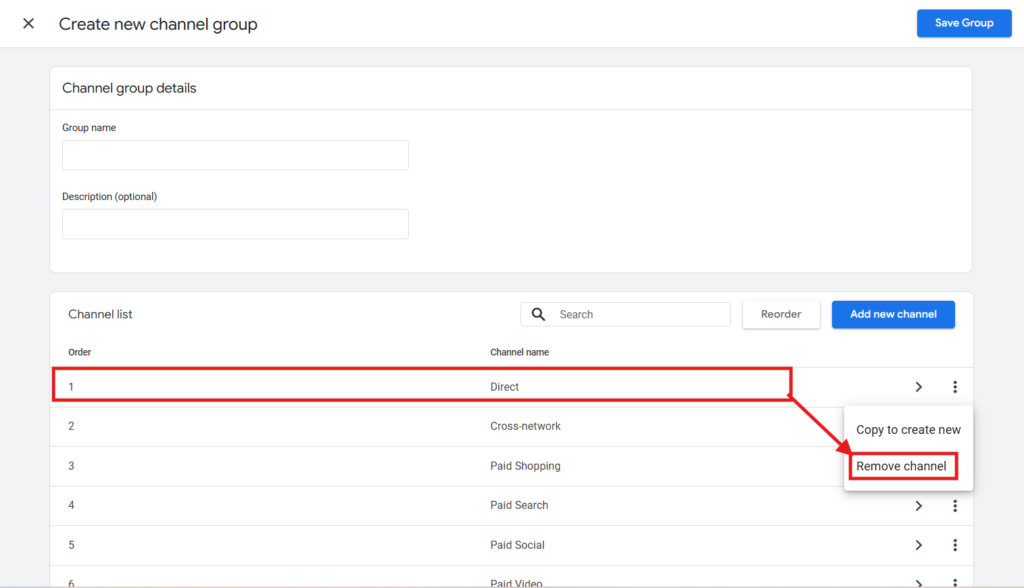
After you remove all channel now its time to add a new customize channel which track AI traffic.
Step 5.
Now its time to create one custom channel, after you delete all the channel and click on add new channel you found 1 field where you need to add Channel which can be anything such as AI Tracker.
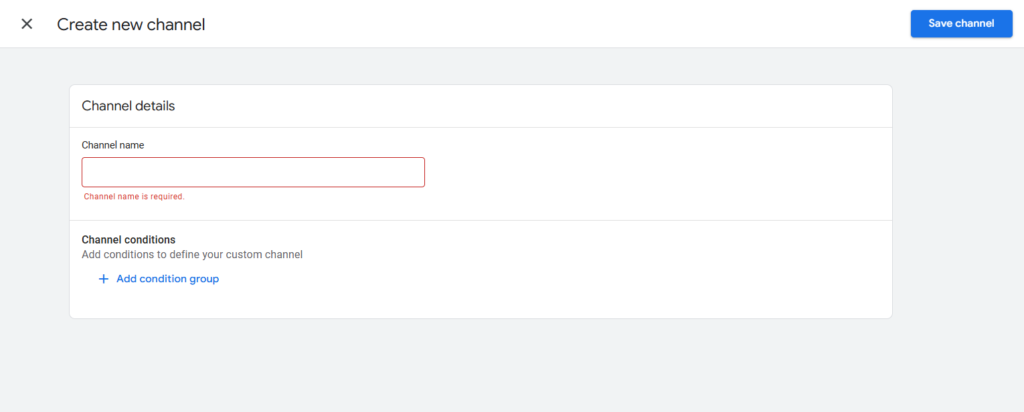
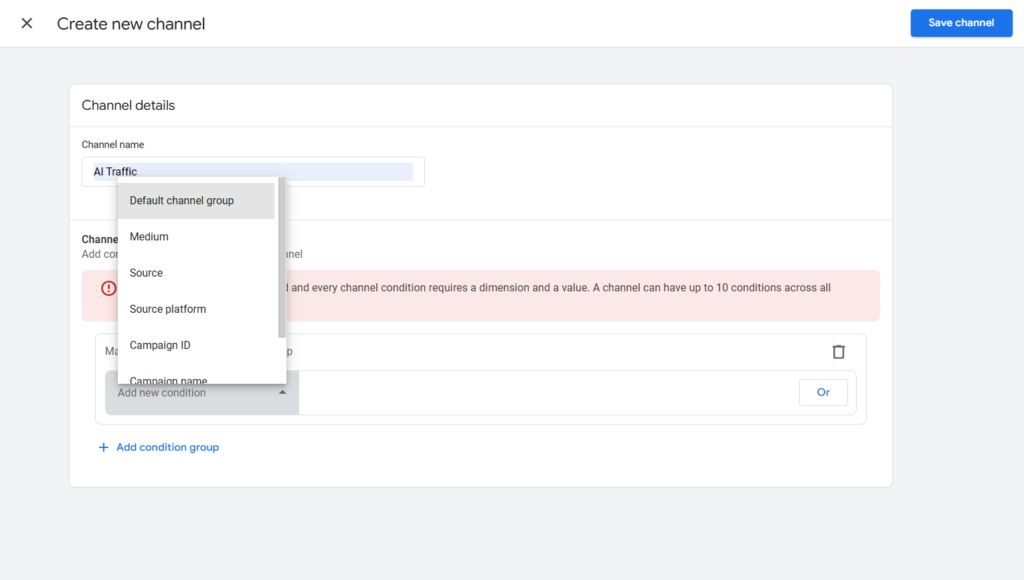
Once you add the name then click on “Add Condition Group” in condition there is a option called “Add New Condition” this is a dropbox here you can select the way you want to track AI traffic.
In this dropdown you need to select “Source” then once you select that its showed an another condition. In this dropdown we will select “Match Regex” and add the below given regex.
Regex = ^.*(openai|copilot|chatgpt|gemini|gpt|neeva|writesonic|nimble|outrider|perplexity|google.*bard|astastic|grok|deepseek|claude|copy.ai|bnngpt).*
After you add the regex hit apply button and click on “Save Channel” then “Save Group” once you done this process your AI traffic tracker is ready.
To check is that working or not we will go to “Report” and then go to “Traffic Aquisiton”
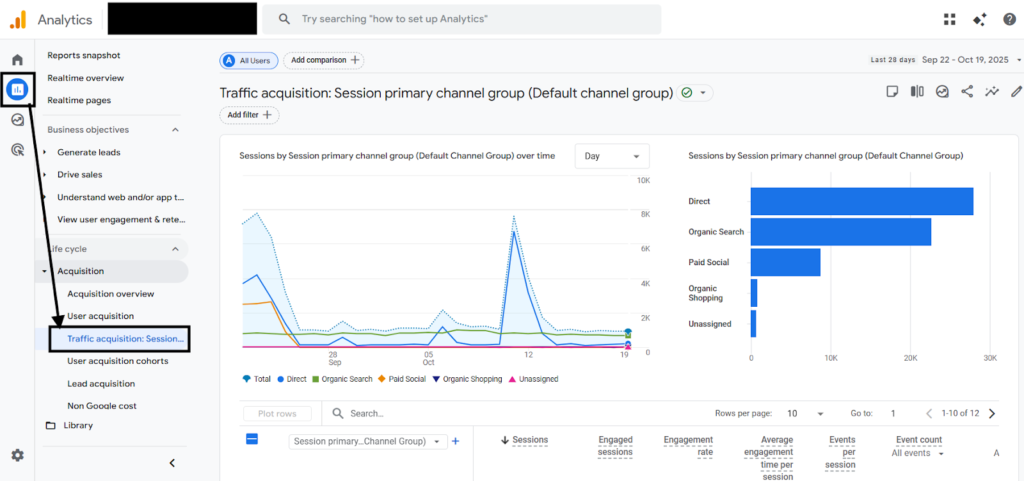
After you land here just scroll down and there is a section where you can change the Channel Group.
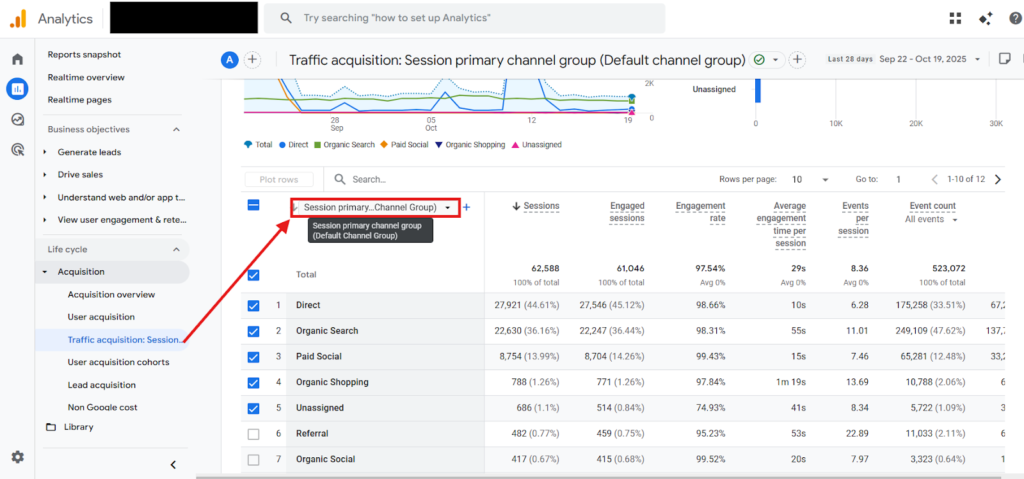
Once you click the dropdown you can see multiple custom channel group and here you can see the AI Traffic tracker.
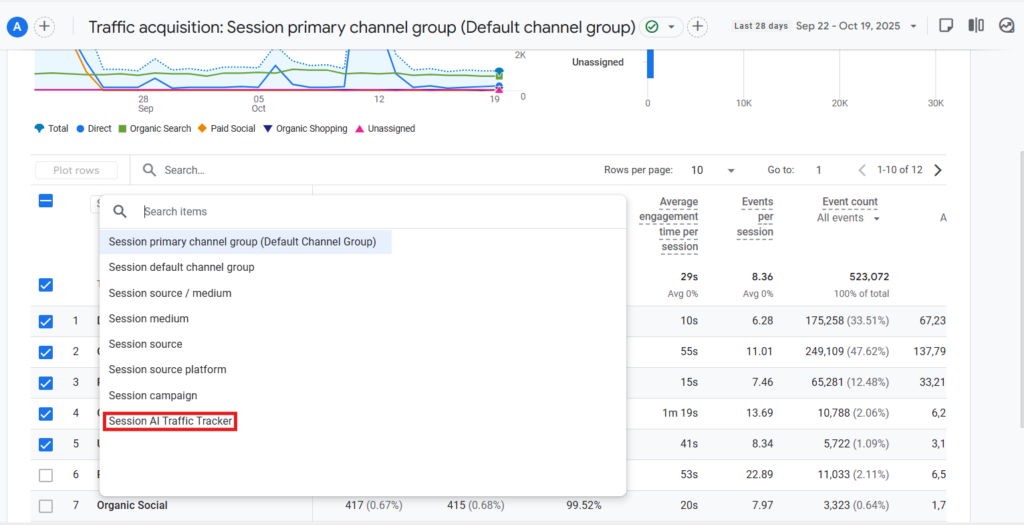
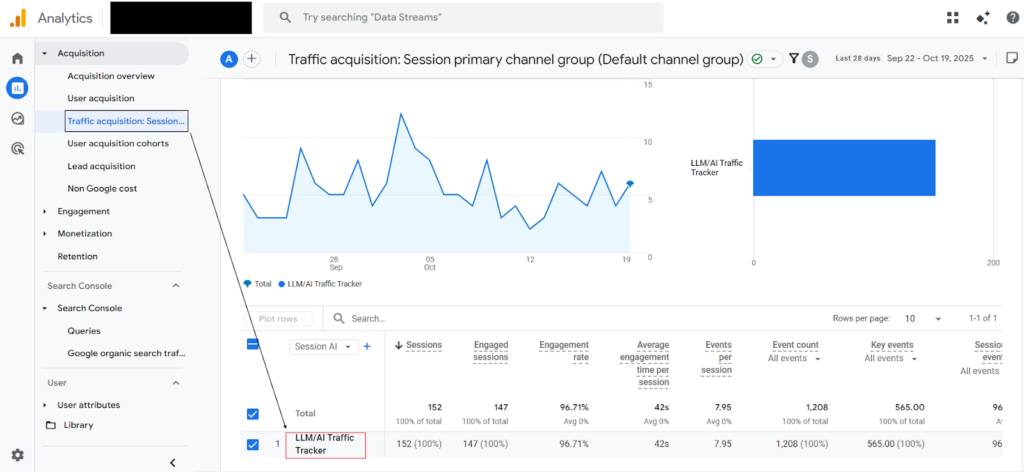
Then click on “Session AI Traffic Tracker” once you click the custom channel then you can the traffic and other important metrics also.
Result:
Insights You Can Gain from Tracking AI Traffic
Once your AI traffic tracker is set up in GA4, you can begin uncovering a range of insights that go far beyond simple session counts. This data helps marketers understand how AI-driven users discover, engage with, and convert on your website. Here are a few key insights you can extract:
1. Identify Top Landing Pages Recommended by AI Tools
Tracking AI traffic allows you to see which pages are being surfaced most frequently by tools like ChatGPT or Perplexity. These are typically the pages that AI systems consider authoritative or relevant for user queries. Knowing this can help you:
- Identify high-performing pages and replicate their success.
- Optimize metadata, schema, and internal links to reinforce their visibility.
- Monitor how AI-driven recommendations change over time.
2. Analyze Engagement and User Behavior
Compare engagement metrics such as average engagement time, pages per session, and bounce rate for AI visitors versus other channels. This helps you understand how users arriving from AI tools behave differently.
- A higher engagement rate could indicate that AI-generated referrals bring more qualified traffic.
- A higher bounce rate might suggest that AI is linking to pages that don’t fully satisfy user intent.
3. Evaluate Conversion Performance
By isolating AI traffic in GA4, you can assess its direct impact on conversions. For instance, if AI referrals lead to newsletter signups, demo requests, or purchases, you can quantify their value within your overall marketing funnel.
- Compare conversion rates between AI, Organic, and Paid traffic.
- Identify which AI-linked pages drive the most goal completions.
4. Discover Content Gaps and New Opportunities
Tracking AI traffic also highlights areas where your content may be missing visibility. If certain high-value topics are not generating AI referrals, that signals a content gap worth addressing. You can create or optimize pages that align better with how AI tools interpret and recommend content.
5. Strengthen Attribution and Forecasting
Over time, measuring AI traffic helps improve your attribution models. It enables you to forecast the growth of this emerging channel and evaluate how AI referrals complement or compete with other sources.
Conclusion and Next Steps
AI-powered platforms are quickly becoming a new gateway to the web. As tools like ChatGPT, Perplexity, Gemini, and Copilot continue to shape how users discover and consume information, it’s essential for marketers to adapt their analytics approach. Tracking AI-driven traffic in GA4 is no longer just a technical enhancement, it’s a strategic necessity.
By creating a custom channel group dedicated to AI sources, you gain visibility into an emerging segment that many brands are still overlooking. This data helps you understand which pages AI tools are recommending, how engaged those users are, and whether this traffic contributes to your business goals. The insights you uncover can directly influence your content strategy, SEO priorities, and long-term attribution modeling.
As AI continues to evolve, so will the way people find your content. Setting up proper tracking today ensures that your analytics stay accurate and your strategy remains future-proof. If you haven’t already, take the time to integrate this setup into your GA4 account and start measuring the impact of AI on your traffic mix. The earlier you begin, the stronger your competitive advantage will be.
Comments are closed.